How ProFixter collects SMS consent
ProFixter is operated by Premium Island Homes Inc.
Suffolk County home improvement licence HI-71484 · Nassau and Suffolk Counties, New York
1. The two phone numbers, and why they differ
Text messages are sent from: 631-888-6340
Customer service and HELP by phone: 631-599-1363
These are two different numbers on purpose. 631-888-6340 is our carrier-registered messaging number and is the number our text messages come from. 631-599-1363 is our customer-service line, where a person answers. Replying HELP to a text returns our automated help reply; calling 631-599-1363 reaches our office during business hours.
Email: getfixter@gmail.com
2. Where consent is collected
There are exactly two places, and they present the same two choices:
- The public account sign-up form at profixter.com/signup.
- The SMS preferences in a signed-in customer's own account settings.
We do not use keyword sign-up. We do not accept verbal opt-ins. We do not accept paper opt-ins. We never buy, rent, or accept a shared or transferred list of phone numbers. Consent is collected by ProFixter, for ProFixter, and is never shared with third parties or affiliates for marketing or promotional purposes.
3. The exact consent language
This is the wording shown beside each checkbox, verbatim, followed by what each choice covers. The two SMS labels are deliberately short: each one is a link to the SMS Terms, which carry the sending number, the frequency and rate disclosures and the STOP and HELP instructions in full. Following the link opens a new tab and does not tick the box.
Group label (HTML <legend>)
Mobile number and text message preferences
The mobile number field and both SMS checkboxes are inside this one group — a single HTML <fieldset> within the sign-up <form> — so it is unambiguous which number a customer is giving permission for. There is only one phone field on the page, and it is the number saved to the account. The group is presented without a visible frame or heading, so the legend is addressed to assistive technology and to anything parsing the form.
Mobile phone number (required for the account, not an SMS opt-in)
Mobile Phone Number
Required for your account, so we can call you and so your Fixter can reach you at the door. Entering it does not by itself switch on any text message: the two checkboxes below it are what record a choice, and both start empty.
Sub-heading
Where the two boxes appear
On the final step of the sign-up form, immediately before the account is created, together with the mobile number they apply to. No text-message question is asked on any earlier step. The form shows the two names above and nothing else — no status word is printed beside either box. Service texts are a condition of creating an account and are enforced when the customer presses Finish, by the form and again by the server; offers and promotions are optional and can never stop an account being created. Both are separate from the Terms of Service and from each other.
Checkbox 1 — service texts (required, unchecked by default)
Service text messages
Booking confirmations, appointment reminders and service updates about the customer’s own visits, sent from (631) 888-6340. Message frequency varies. Message and data rates may apply. Reply STOP to opt out or HELP for help. The label links to the SMS Terms, where all of this is set out in full. Required to create an account, and never pre-ticked: the customer performs the tick.
Checkbox 2 — marketing texts (optional, unchecked by default, separate)
Offers & promotions
Optional, and separate from the service texts above. Not required to create an account, book or buy anything, and declining it can never stop an account being created. Message frequency varies. Message and data rates may apply. Reply STOP to opt out or HELP for help. The label links to the marketing section of the SMS Terms.
Checkbox 3 — Terms acceptance (required, outside the SMS group, contains no SMS consent)
I agree to the Terms of Service and Privacy Policy.
Required to create an account.
4. What is, and is not, consent
- Service SMS is required to create a ProFixter account, and is still an affirmative act: the box is never pre-ticked and the customer has to tick it themselves.
- Marketing SMS is separately optional. It has its own box and its own record.
- Both boxes are unchecked by default. Neither is pre-selected at any point.
- Marketing SMS is not required to register an account, to book a visit, or to purchase a membership or any service, and declining it changes nothing about price, availability or service.
- Service SMS is a condition of holding an account and nothing further. It is not a condition of any individual booking, membership or purchase, and it never implies marketing consent.
- Entering a phone number is not consent. A number is required to register so that we can telephone you and so your Fixter can reach you at the door. It never by itself switches on any text message.
- Accepting the Terms of Service is not SMS consent. The Terms checkbox covers the Terms and the Privacy Policy and nothing else. No SMS consent of any kind is bundled into it.
- Texting ProFixter is not SMS consent. Sending us a message does not subscribe you to any category of message.
- Replying START or UNSTOP is not SMS consent. See section 6.
- There is no verbal opt-in, no paper opt-in, no keyword opt-in, and no purchased, rented or shared list.
Where a customer has not ticked a box, we hold no consent, and we send no text. Silence is never treated as agreement, and an account created before these checkboxes existed is treated as having said nothing at all — because that customer was never asked.
5. What the sign-up form actually looks like
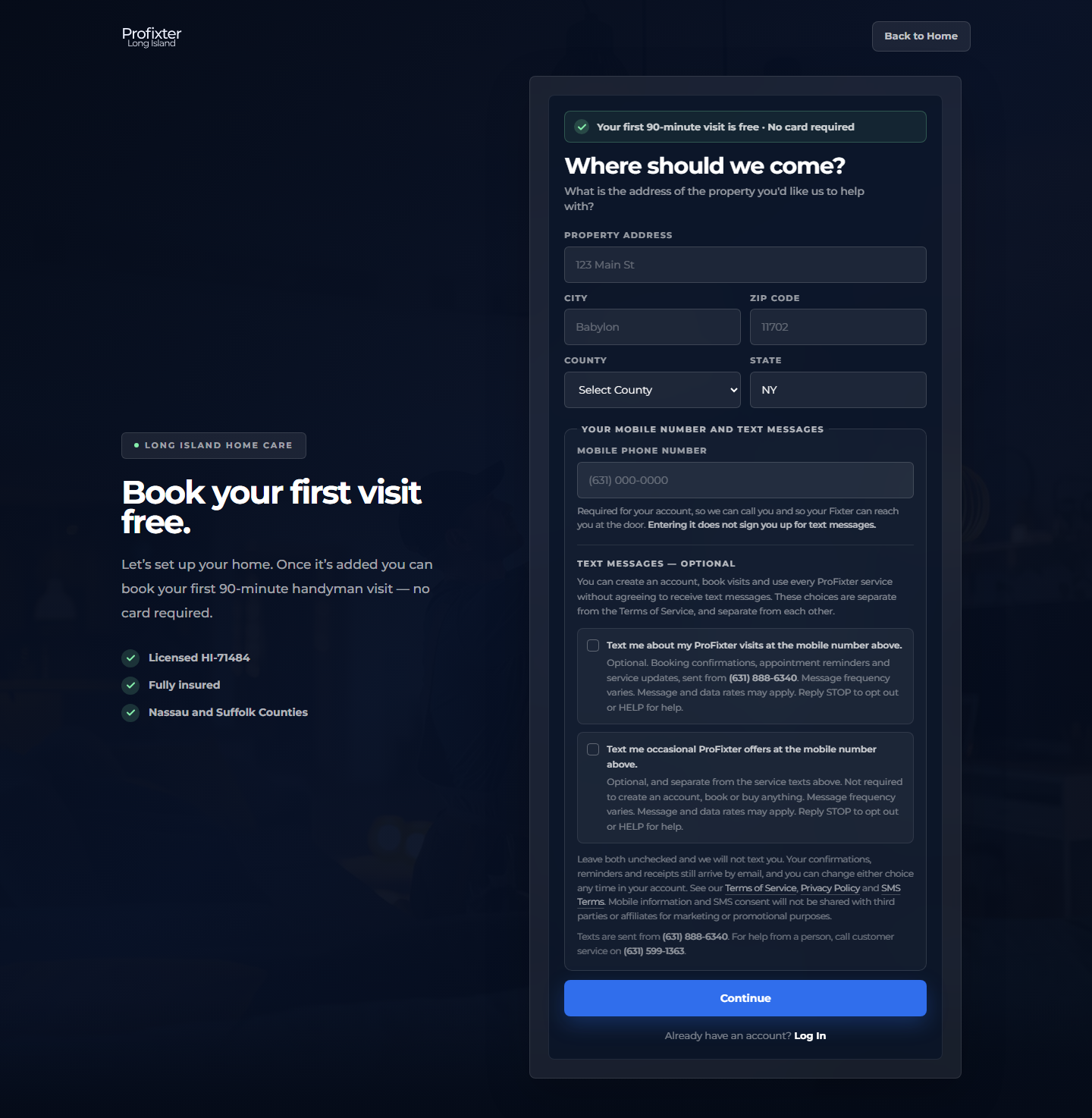
These screenshots are taken from the live site. Sign-up is a four-step form, and the two text-message choices are asked once, on the final step, immediately before the account is created — together with the mobile number they apply to. The three earlier steps collect the property address, the customer’s name and their email address, and none of them mentions text messages or shows a consent control of any kind.
On that final step the mobile number field and both checkboxes sit inside a single HTML<fieldset> within the sign-up <form>. There is exactly one phone input on the page, so the number being consented is necessarily the number saved to the account — the two cannot differ. The required Terms of Service checkbox is in the same form but deliberately outside that group, because it carries no SMS consent.
Each checkbox label is a link to the SMS Terms. Clicking the box toggles it; clicking the label opens the terms in a new tab and leaves the box exactly as it was, so nobody can record a consent while trying to read what it means.
The final step of the sign-up form on a desktop browser, reached after the address, name and email steps. The mobile phone number field and both SMS checkboxes sit together in one group; both boxes are unchecked, and each label links to the SMS Terms.
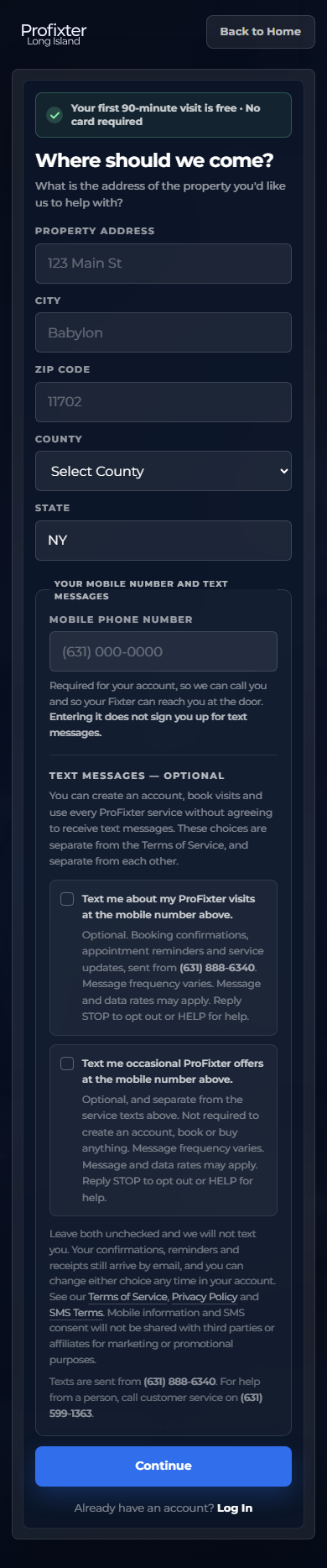
The same step at phone width. The mobile number field and both unchecked checkboxes are shown together on one screen, immediately above the button that creates the account.
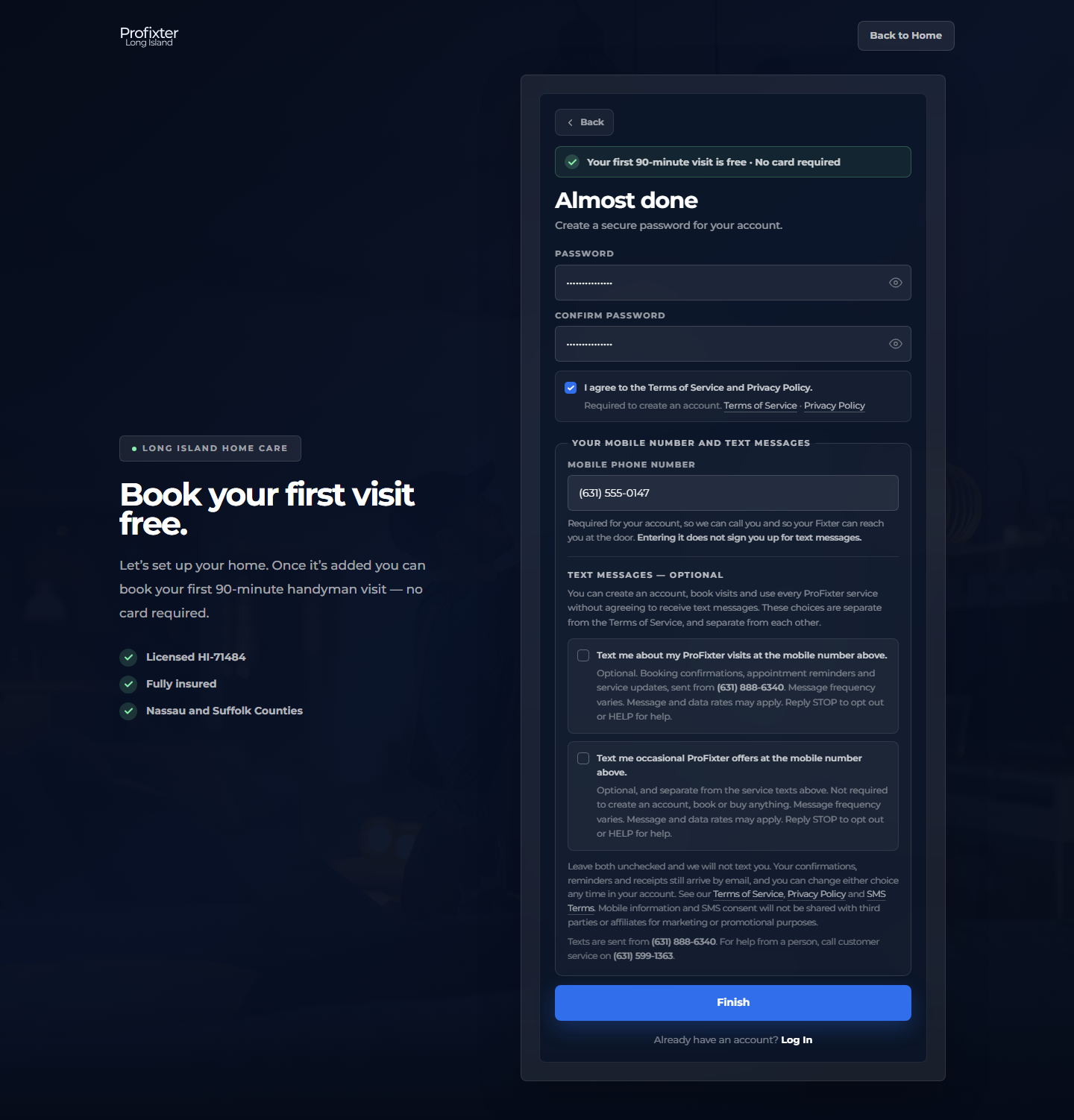
The same step, completed. The Terms of Service box and the service text box have each been ticked by the customer; the offers and promotions box has been left alone. The form submits in exactly this state and creates the account, and no marketing consent is recorded — which is what makes the two genuinely separate.
A signed-in account with both categories switched off from account settings. Service texts are a condition of creating an account, but they are not a condition of keeping one: a customer can switch them off here at any time afterwards, in one place, without contacting us. Confirmations, reminders and receipts continue to arrive by email.
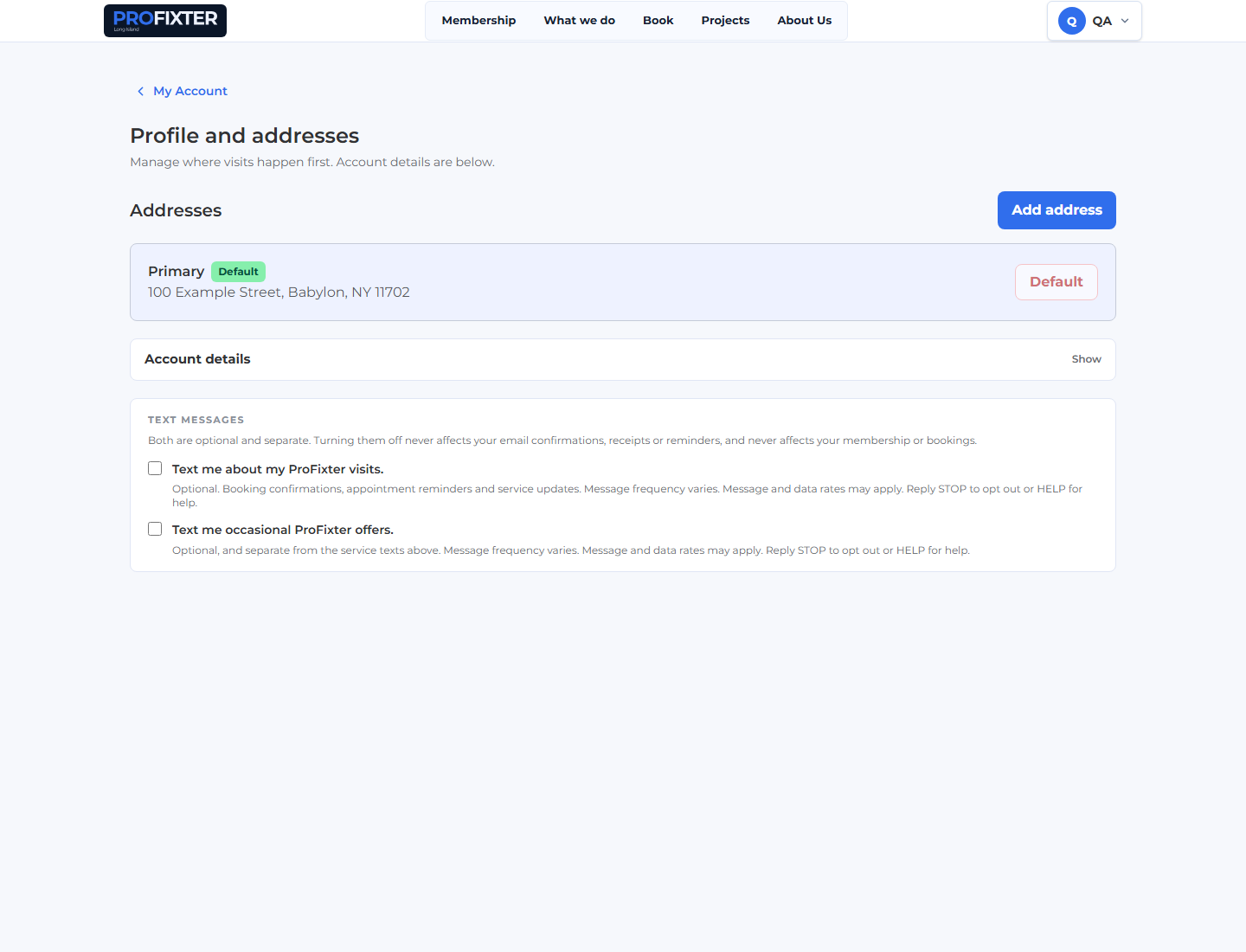
Account settings. The two choices remain independent after registration: turning one on never turns the other on, and either can be switched off at any time.

6. STOP, HELP, and what START really does
- STOP (also STOPALL, UNSUBSCRIBE, CANCEL, END, QUIT) stops every category of text to that handset, service and marketing alike. It also switches both stored preferences off, so the account no longer records a consent the customer has just withdrawn. A single confirmation message is returned.
- HELP (also INFO) returns our automated help reply, identifying Premium Island Homes Inc., message frequency, that message and data rates may apply, how to opt out, and where to reach us.
- START or UNSTOP removes the block on the handset and nothing more. It does not grant service SMS consent and it does not grant marketing SMS consent. After replying START, a customer still receives no text messages from us until they switch a category back on themselves in their account settings. This is deliberately more conservative than the carrier default, so that our record always reflects a choice the customer actually made.
7. What we keep as a consent record
For each of the two choices, independently, we retain:
- the consent status — on, off, or never chosen;
- the date and time it was recorded;
- the place it came from — the sign-up form, or the customer's own account settings.
Service texts and marketing texts are recorded separately, and neither is ever inferred from the other. “Never chosen” and “switched off” are stored as different states and stay distinguishable, because only one of them means the customer was ever asked.
8. Message categories
Service texts — booking confirmations, rescheduling and cancellation notices, appointment reminders, notice that a Fixter is on the way, membership and account notices, and payment problems.
Marketing texts — occasional offers about memberships, seasonal work and renovation services. Every marketing message carries “Reply STOP to opt out.”
9. The documents themselves
- https://www.profixter.com/signup — the sign-up form where consent is collected
- https://www.profixter.com/privacy — Privacy Policy
- https://www.profixter.com/terms — Terms of Service
- https://www.profixter.com/communication-consent — Communication Consent & SMS Terms
Mobile information and SMS consent will not be shared with third parties or affiliates for marketing or promotional purposes.